Music production overview
WebM + MP4
— FL Studio · Visual-first guides
High-detail workspace visuals for playlist, piano roll, and mixer, paired with workflows, fixes, and producer stories so you move faster with fewer dead ends.
Explore workspace · Read guides
Layout
Rack ’ Playlist ’ Roll ’ Mixer
Depth
Guides + FAQ
Focus
Real UI flow
Language
English
Patterns hold ideas · the playlist turns them into a song · the mixer is where balance and FX live. If those three feel fuzzy, the browser can wait.
also: Short clips Editions Articles FAQ
Start anywhere
Each hub stands on its own · bookmark what you reopen every week. This overview orients you before you dive in.
Patterns, mixer moves, automation habits, and export discipline in one place”plus clip habits you reopen weekly.
Open hub ’
How the screen fits together · playlist, piano roll, mixer, and session flow. Repeat the same mouse path until it feels boring”that is the win.
Tour the UI ’
Habits, deadlines, references, and the human side of finishing music”mindset and schedule fixes, not shopping lists.
Read stories ’
Decision helpers for editions, hardware reality, and where to read next. Skim before you spend or brief a collaborator.
See editions ’
Capability tables, trials, disk space, and license sanity checks. Confirm bundled plugins and trial windows before install day.
Compare table ’
How to read release notes, rollback mindset, and OS vs DAW upgrade order. Use the night before a bump”not during a paid session.
Upgrade smarter ’
Longer reads · buffers, stems, monitoring, gain, sidechain, stereo, EQ, and more. One topic per tab instead of forum rabbit holes.
Browse articles ’
Straight answers to common setup and workflow questions”fast checks when meters go red or audio drops out.
Get answers ’
Pick a lane
Same hubs · different order depending on what blocked you today.
Goal tonight: one pattern named, colored, and sitting on the playlist grid”then save with BPM in the title.
Goal tonight: 15-minute audio sanity pass, one rough bounce, note driver version if anything crackled.
Goal tonight: stems zipped with README, BPM/key, tuning cents, and wet vs dry expectations spelled out.
Local motion
All clips are loaded from the local vd folder · no external video hosts.
Pair with Workspace when you want motion plus static UI maps in the same study session.
WebM + MP4
Practical first
Most “mystery†problems are a short list: buffer size, sample-rate match, drivers, background disk load, and one greedy plugin. If two quick fixes change nothing, line up those suspects before you blame “FL itself.â€
Finish lines are rarely about more plugins. Usually it is arrangement clarity, MIDI habits, and export hygiene. When the loop already feels good, mute tests and section markers beat another sample pack.
Tone & mix hygiene
Independent guides only
Behaviors change by version and OS. When something matters for a paid decision, verify on your own machine and any paperwork or receipts you already have”before you spend.
For when playback is stable but tone still fights you, loudness feels wrong on streaming, or you are choosing interfaces and drivers for real recording.
Treat these as reopen-later bookmarks”reference loudness, stereo translation, and rooms once crackles stop stealing your attention.
Fewer presets, more intentional filtering, movement, and space.
Protect punch and transitions before the ceiling does the thinking for you.
References, dynamics, and why streams punish overcooked masters.
What actually changes when you record vocals or live instruments.
Workflow
Same loop most finishers use · sketch wide, arrange honestly, mix with headroom, then commit audio and exports when the decisions stick. Each step below is a repeatable pass”skip the stage that is not broken, but never skip naming what you changed.
Sketch
Patterns first
Capture hooks and drums without locking final structure.
Arrange
Playlist narrative
Turn loops into sections with mutes, markers, and contrasts.
Balance
Mixer discipline
Busses, sends, and automation that support the song, not the meters.
Ship
Print & hand off
Stems, names, and README notes collaborators can open cold.
Choosing an edition? Lineup overview Comparison table
People & files
Most friction is not “which plugin†· it is missing BPM notes, mystery stems, and projects that only open on one machine. This block is for handing work to another human (or your future self) without archaeology. Add rough LUFS or “not mastered yet†in the README so expectations stay grounded.
Name stems after role and section, freeze optional FX prints, and write key, tuning quirks, references, and known issues in a short README. Call out wet-only vs dry safety prints so an outside mixer does not fight your FX busses.
Duplicate important songs before OS or DAW jumps, export a rough WAV after big arrangement swings, and keep installers handy when a show is looming. Store the last known-good installer off the Downloads folder”cloud sync likes to “help†at the worst time.
Before you bounce
Mono or phone speaker once
Balance and vocal intel before width FX.
Peak headroom at the master
Leave the limiter room to do one job.
File name = intent
Date, mix pass, BPM in the title or folder.
Stereo width and loudness dives live in mono, release, and limiting.
Momentum
Two hours with a single goal · arrange the bridge, print drums, tune vocals · beats six hours of “I will just tweak the hi-hat.†Name the win before you open the project; when the timer ends, save, note the next step in the project title or a sticky, and walk away.
Automation is for musical motion: filter sweeps, send throws, and level rides that listeners feel. If you are automating to fix a part that never sat in the arrangement, mute channels first · often the “fix†is fewer layers, not more lanes.
Import a finished track in the same genre, pull its fader down until it matches your rough mix loudness, then A/B for balance · not for copying EQ curves by eye. Note vocal sibilance and kick length”you are borrowing intent, not curves.
Loudness & dynamics ’When a synth stack is “done enough,†bounce to stem. You keep the sound but free CPU and mental bandwidth for vocals and arrangement. Name the print with patch + BPM so rollback is obvious.
CPU priorities ’Drop intro / verse / chorus markers before you polish. They make export ranges, collaboration notes, and your own focus clearer in one glance. Color them if you hand sessions to other editors.
Feature map ’Site map
A single scrollable map: topic hubs, session rhythm, collaboration hygiene, local video clips, troubleshooting, and deep links into articles · without changing how the hero introduces the project. Scroll once to see how each block hands off to the next”from stability to tone to shipping files.
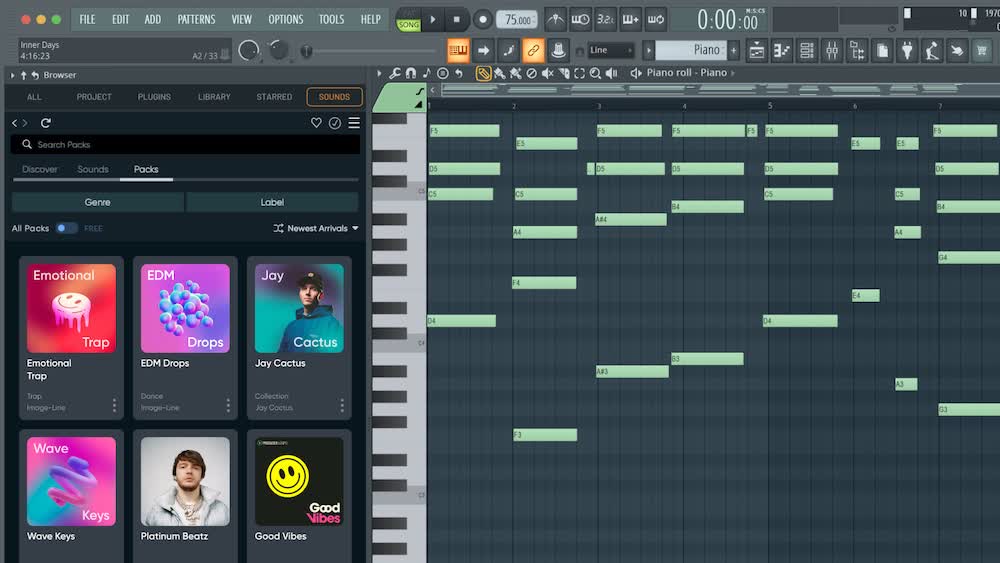
Workspace screenshots and UI copy reference layouts you can match on your own machine · pair with Workspace when you need the tour. When a menu moves after an update, you still know which window should be under the cursor.
Stems, buffers, and reference listening show up in the same narrative as creative tips · so “technical†and “musical†stay one session. Finish-line anxiety drops when exports and listening checks are habits, not emergencies.
Jump straight to a section with these in-page anchors. URLs with #anchors are shareable”handy when you paste a teammate into exactly the block they need.
Also under the hero: #session-primer · #home-deeper-reads · #home-collab-lab · #home-start-here
Practical rhythm
Sketch fast, arrange honestly, mix with headroom · then repeat the habit instead of hoarding unfinished tutorials. The three cards mirror a typical night”bail early if that stage is already solved.
Tempo, key, and a lean template beat a blank project. Record scratch vocals and MIDI before you chase the perfect plugin chain.
Turn loops into verses and choruses before obsessive EQ. Muting tracks often shows you already have too many layers, not too little polish.
Level-match A/B on headphones, car, and one modest speaker. Loudness lies; contrast, balance, and translation tell the truth.
After the three-step stack
Check gain staging so saturators and limiters see sane levels, carve one problem per EQ move, and confirm mono on phones before you chase width. Sidechain for pocket · not only for EDM pump · and leave limiting for last so drops keep impact after streaming normalization. Keep a pre-limiter bounce when someone else prints the master.
The FAQ covers common playback and CPU questions; the blog index walks through gain, EQ, sidechain, stereo, and limiting as separate deep reads.
Featured producers
Local portraits only · served from images/artists/. Use this strip as
cultural shorthand: many of these names show up in public FL Studio education, not as product endorsements.


Portraits are for cultural context · many of these artists appear in public FL Studio tutorials and press. No endorsement of this independent site is implied.
Collaboration
Keep audio under the project tree, name stems by role and section, and add a README with BPM, key, and odd tunings · so mixers spend time on sound, not archaeology.
Use a predictable folder inside the zip”Stems/YYYY-MM-DD/”and say whether prints are wet-only, dry safety, or both. One sentence about round-trip latency saves a vocalist a wasted hour.
When something sounds wrong
Crackles, dropouts, and “weird latency†usually start with buffer size, sample-rate match, drivers, and background apps · not a missing $49 preset pack. Walk the checklist once; you will reuse it on every new machine.
Templates, busses, and keyboard muscle memory compound fastest when you ship rough mixes regularly. Pick one small improvement after each bounce · naming clips, color rules, a default send · for a month instead of rebuilding the perfect studio that never records. The smallest repeatable win beats a heroic weekend that never loops back.
Producer habits ’Before a crash teaches you
Boring habits buy back creative afternoons when disks, plugins, or OS updates misbehave. Automate only what you will actually open”an untested backup script is folklore until it restores a file.
After big arrangement swings, save-as with a date in the name · rollback without memory games. Keep “_idea†and “_mix†suffixes honest so you never open the wrong hero take at 3 a.m.
Weekly copy to another drive or bucket; include the samples the session actually plays, not only the project file. Note third-party sample pack paths if they live outside the project folder.
Print a rough WAV at “chorus locked†and “pre-master†· corruption hurts less when yesterday’s idea survives outside the DAW. Name the bounce with BPM and “no master†when limiting is still a question mark.
Habits & deadlines · Save-as & layout notes · Export discipline
Educational summaries for learning.
Before you install
When you install, duplicate the current song first. The first launch of a new version is not the night before a deadline.
Install checklist
Next steps
Start with a stable template, add one new technique per session, and keep notes on what changed when something breaks. Progress compounds when your troubleshooting is repeatable”write buffer size and driver version next to the song title for one week after you fix a crackle.
Educational summaries for learning · not affiliated with Image-Line.
Before you go
The hero is the front door; this strip is for when you already have a project open and want a bookmark that is not another tutorial headline. Treat it as the “I am stuck but I know which kind of stuck†lane”layout, long reads, or emergency FAQ.
Match what you see in your own install · playlist, piano roll, mixer · without guessing where menus moved after an update. Screen-accurate context means you can describe bugs with window names your collaborator recognizes.
Workspace tourCPU, buffers, arrangement, sound design · pick one topic per week instead of stacking half-finished tabs. Finish the article’s action item before you open another tab with good intentions.
Browse blogsShort answers for playback, CPU, and setup · use them as a checklist before you assume the DAW is the problem. Copy the bullet that fixed you into a sticky”you will need it on the next machine.
Open FAQListening rotation: headphones for detail, one modest speaker for balance, car or phone for translation · run the same rough mix through all three before you chase width in the stereo field.
Monitoring habits · Producer experiences
Share exact blocks: #session-primer · #home-deeper-reads · #handoff
Beyond the timeline
Different from the hero pitch: small habits · templates, CPU discipline, arrangement commits, export hygiene · that still help when the chorus is already written. Stack one thread per month; four shallow threads never become skill.
Want the full library? All articles · Feature map
Studio reality
Deadlines, references, edition depth, update cadence, and local clips · layers that decide whether you ship, separate from piano-roll tricks. When the calendar is louder than the chorus, this strip is the right rabbit hole.
Motion on this domain:
short FL Studio clips under vd/ · pair with the workspace tour when you want screen-accurate context.
Sound & signal
Not arrangement philosophy · concrete reads on crackles, I/O, drum weight, and loudness habits when the meters lie. Use it when you have ten minutes at the desk and need a single next click, not a course syllabus.
Stuck between two errors? FAQ · Monitoring